
CLZ Comics comic book database
CLZComics
4.84.97K Reviews
- Version
- 11.4.3
- Installs
- 100.00K
- Age Rating
- Everyone
Screenshots
Our Review of CLZ Comics comic book database
 Analysis by Appyee
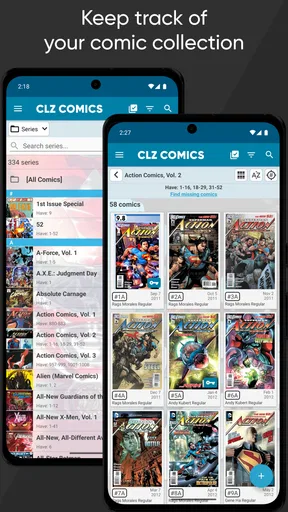
I like the idea of getting a collection under control before it turns into a stack of boxes and half-remembered purchases. CLZ Comics is a comic-book cataloging app from CLZ, built for keeping track of what you own and what you hope to find. Its main appeal is practical: instead of trying to remember whether an issue is already on your shelf, you can check a record on your phone. I’d consider it most useful once a collection is large enough that memory alone stops being reliable.
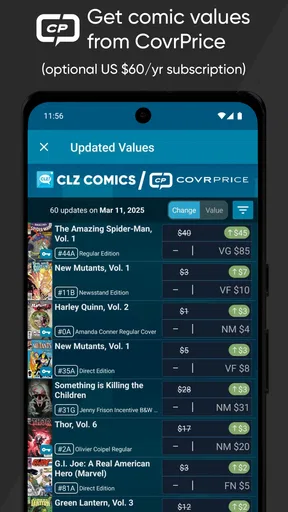
It is a free app for everyone, with in-app purchases ranging from $1.99 to $89.95 per item; the service is also described as costing US $20 a year. That distinction matters when you are deciding whether to try it: getting started does not mean you have to commit immediately, but a full collecting workflow may involve a paid option. The app has been around since December 6, 2010, and its current version is 10.7.2, so this is an established cataloging tool rather than a new experiment.
What to expect from a comic-book catalog
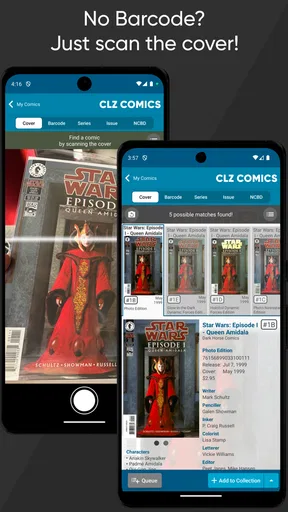
This is an app for organizing comics, not for reading them. The useful result is a searchable record of your collection: you can identify an issue by scanning its cover with your device camera, then use your catalog to check what you already own. That focus makes it different from a notes app or a general spreadsheet, where you have to decide how to describe every comic and keep the fields consistent yourself.
That difference becomes meaningful when several editions, volumes, or similarly named series are involved. A loose note such as “issue 12” is easy to misread later; a catalog entry tied to a comic’s record is more helpful when you are browsing a long box or comparing a potential purchase with your existing collection. I would still check the displayed issue details before saving a match, especially if the cover is worn or the edition is unusual. A scan is a quick way to find a likely record, not a reason to stop paying attention.
Getting started without making a project of it
First things first, let’s talk about the setup. Downloading and installing CLZ Comics is a breeze. Once you’ve got it on your device, you’re greeted with an intuitive interface that even someone with zero tech skills could navigate. The app offers a quick tutorial that guides you through the initial setup, which I found really helpful.
For a first-time user, I would begin with a small, easy-to-check group rather than trying to catalog every box in one sitting. Pick a short run or a handful of comics whose covers and issue numbers you can inspect. That gives you a chance to learn how scanning and searching fit into your routine before you invest time in a large backlog. It also makes mistakes easier to spot: you can compare the saved records with the physical comics right beside you.
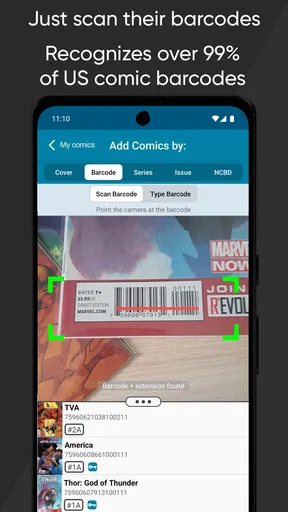
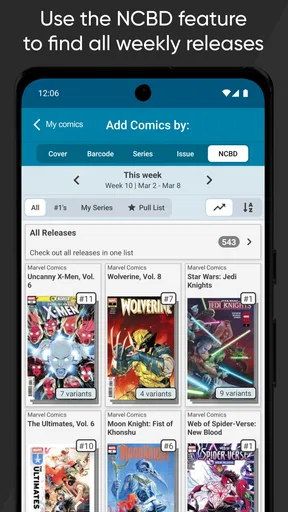
Adding comics to your database is as simple as pie. You can scan barcodes using your phone’s camera, which is super convenient. Alternatively, you can search by title or series. I was amazed at how quickly the app pulled up information. It’s like having a comic book expert right in your pocket!
A good first success is not merely getting one scan to work; it is being able to answer a real question with the catalog. For example, before leaving for a comic shop, add a few issues from a series you are actively collecting, then check the list while planning what to look for. When you return, you can record what you picked up while the receipts and books are still at hand. That small loop—catalog, check, update—is more likely to stick than a weekend spent entering everything and then forgetting to maintain it.
Building a useful collection record
Before I start entering a whole collection, I’d decide what I want the record to help me do: avoid duplicates, follow a run, or keep track of books I’m still hunting. That choice gives each entry a practical purpose and makes the catalog easier to maintain. Once the goal is clear, I can move on to a simple routine for building it a batch at a time.
Features that help beyond basic entry
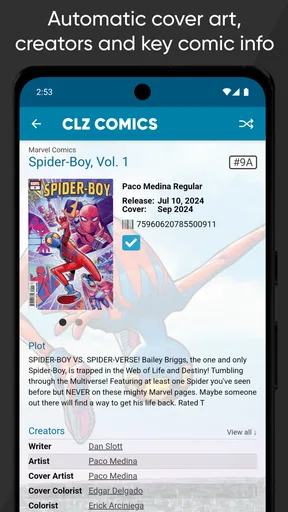
What sets CLZ Comics apart? For starters, the app boasts a massive database. Whether you’re into classic superheroes or indie gems, you’ll find your favorites here. The detailed information on each comic, including plot summaries, character appearances, and publication details, is a dream come true for any collector.
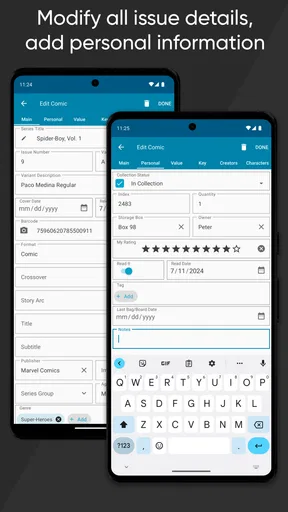
One feature I absolutely love is the ability to create wish lists. We all have those elusive issues we’re dying to get our hands on, and this feature makes it easy to keep track of them. Plus, you can organize your collection by series, publisher, or even personal ratings. It’s like your collection, your way.
Wish lists are particularly handy when your buying plans are more specific than “find something good.” I’d use one for a run I am trying to complete and keep another mental distinction for books I would buy only at the right price or in the right condition. The app’s list can remind you which issues matter, but your own buying rules still matter too. A catalog helps prevent duplicate purchases; it cannot decide whether a particular copy is worth bringing home.
Organizing by series or publisher can also make a large collection easier to review in stages. If you are entering books over several sessions, choose one clear boundary—one series, one shelf, or one box—and finish that batch before moving on. This reduces the chance of skipping issues simply because the same title is scattered across different piles. It is a modest workflow choice, but it makes the catalog more dependable than an ambitious all-at-once session.
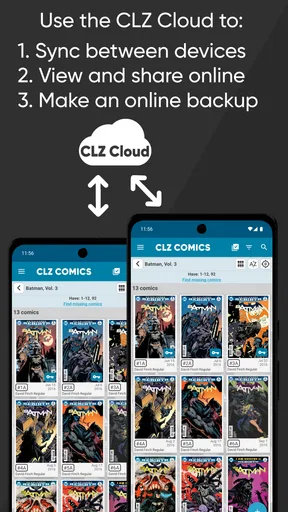
Another cool aspect is the cloud syncing feature. You can access your collection from multiple devices, ensuring you’re never without your trusty database. And let's not forget the app’s impressive backup options. Losing track of your collection is a thing of the past!
For a collector who checks their catalog in more than one place, syncing and backup are useful safeguards, but I would still treat them as part of a sensible routine rather than a reason never to verify anything. After a substantial cataloging session, take a moment to check that the latest entries appear where you expect them. If you are sharing devices or switching between them, knowing which copy of a record is current can save confusion. The collection is only as useful as the accuracy of the records you maintain.
How it feels in day-to-day use
Let’s talk about the user experience. The layout is sleek and modern, with a dark theme that’s easy on the eyes. Navigation is smooth, and the app’s responsiveness is top-notch. Whether you’re a casual collector or a hardcore fanatic, the design caters to all.
I particularly appreciate the search functionality. It’s fast and accurate, making it a joy to use. Plus, the app regularly updates its database, ensuring you have the latest info at your fingertips.
The strongest everyday use case is a quick check while you are away from your shelves. Picture finding a comic at a shop or looking through a friend’s boxes: instead of relying on a fuzzy memory, you can search your existing records and see whether the issue is already accounted for. This is where a phone-based catalog earns its place. It turns an impulsive “I think I own this” decision into a more informed one, while leaving the final call about condition, price, and interest to you.
Compared with a handwritten list, a digital catalog is easier to search and revise as a collection changes. Compared with a spreadsheet, a comic-focused database can save the work of inventing a consistent format for titles and issues. A spreadsheet may still suit someone who wants complete control over custom columns, while a paper list can be simpler for a small collection. I would choose CLZ when quick identification and a browsable record matter more than building a tracking system from scratch.
Where a little care still matters
The camera-led workflow is convenient, but it is not a substitute for checking the result. A damaged cover, an unfamiliar printing, or a book without an easy-to-scan barcode can make searching by title or series the better route. I would also avoid treating a match as proof that every detail is correct: compare the issue information against the physical comic before you rely on the entry for a purchase decision or a collection audit.
There is also a simple trade-off between a quick catalog and a complete one. If you only want to remember a few favorite books, recording every issue may be more effort than the benefit is worth. The app is a stronger fit for people who regularly buy comics, track runs, or need a reliable inventory across a sizeable collection. Someone who rarely checks what they own may be happier with a short manual list.
Its average rating is 4.8 from around 15,000 ratings, with about 4,800 written reviews and over 100,000 installs. It runs on Android 6.0 and later. Those figures suggest that it has found a substantial audience among collectors, but they do not tell you whether its cataloging habits suit your own. I would judge it by a practical test: can you add a small group of comics and later find the exact record you need without fuss?
Who should give it a try
For someone just starting out, I’d recommend using the free entry point to see whether cataloging becomes part of the collecting habit. If you already buy comics often and have found yourself purchasing duplicates, the ability to check your records before buying could quickly feel worthwhile. If you collect casually and can see everything you own at a glance, the setup may be unnecessary. There is no need to turn a hobby into data entry unless the record solves a problem you actually have.
One question many new users have is whether scanning is the only way to add books. It is not: searching by title or series is another route, which is useful when a barcode scan is not convenient. Another is whether the catalog can help plan future purchases. The wish-list feature is designed for that kind of tracking, though it remains your job to decide what counts as a priority and what condition you will accept.
People also wonder whether a catalog is useful when they own comics across several shelves or devices. The cloud-syncing feature is intended to make the collection available across devices, while backup options provide another layer of protection. I’d still build the habit of checking recent changes, particularly after a big sorting session. If you only use one device and keep a small collection, those capabilities may matter less than quick search and straightforward entry.
Final thoughts on CLZ Comics
So, is CLZ Comics worth the download? In my opinion, absolutely. It’s a comprehensive tool that revolutionizes how you manage your comic book collection. The ease of use, combined with its robust features, makes it a must-have for any comic book lover.
Sure, there might be a learning curve if you’re new to digital databases, but the app is designed to help you every step of the way. Plus, the support team is just a click away if you ever need assistance.
In summary, CLZ Comics is more than just an app; it’s a collector’s best friend. Whether you’re cataloging your current stash or on the hunt for new additions, this app has got you covered. Happy collecting!
Privacy and Permissions
See what permissions an app requests and how it handles your data.
- Photos/Media/Files
- read the contents of your USB storage, modify or delete the contents of your USB storage
- Storage
- read the contents of your USB storage, modify or delete the contents of your USB storage
- Camera
- take pictures and videos
- Wi-Fi connection information
- view Wi-Fi connections
- Other
- view network connections, connect and disconnect from Wi-Fi, full network access, control vibration, prevent device from sleeping
Verdict
Strengths of CLZ Comics comic book database
- User-friendly interface for easy navigation.
- Comprehensive comic database with updates.
- Barcode scanner for quick comic entry.
- Cloud storage sync across devices.
- Customizable collection views and filters.
Limitations of CLZ Comics comic book database
- Requires subscription for full features.
- Limited offline functionality.
- Occasional sync issues reported.
- No support for digital comics tracking.
- Ads in the free version may be intrusive.
Other Releases by CLZ
View All
CLZ Music, CD/vinyl collection
Music & Audio4.7
Similar Picks in This Category
View All
WEBTOON: Manga, Comics, Manhwa
NAVER WEBTOON4.6

MangaToon: Comic & Manga
MangaToon4.3

네이버 웹툰 - Naver Webtoon
NAVER WEBTOON4.3

Tapas – Comics and Novels
Tapas Entertainment Inc.4.2

Lezhin Comics - Daily Releases
LEZHIN ENTERTAINMENT3.3

WebComics - Webtoon & Manga
WEBCOMICS HOLDINGS HK LIMITED4.4
Frequently Asked Questions
What is CLZ Comics and how does it work?
CLZ Comics is a comprehensive comic book database app designed for collectors to organize and manage their comic collections. Users can easily catalog their comics by scanning barcodes or searching online databases. The app provides detailed information about each comic, including cover art, release date, and issue details, making it easier to keep track of your collection.
Is CLZ Comics available on both Android and iOS platforms?
Yes, CLZ Comics is available on both Android and iOS devices. You can download the app from the Google Play Store for Android devices or the Apple App Store for iOS devices. The app offers a seamless experience across platforms, allowing users to sync their collections through the cloud for accessibility on any device.
Does CLZ Comics require a subscription or is it a one-time purchase?
CLZ Comics operates on a subscription basis. While downloading the app is free, to access its full range of features, including cloud syncing and unlimited entries, users need to subscribe to a monthly or yearly plan. The subscription ensures users receive regular updates and access to the latest comic book data.
Can CLZ Comics be used offline?
Yes, CLZ Comics can be used offline to view and manage your collection. However, certain features, such as syncing with the cloud and accessing the latest database updates, require an internet connection. It’s recommended to periodically connect online to ensure your collection is up-to-date and backed up.
How secure is my comic book data in CLZ Comics?
CLZ Comics places a strong emphasis on data security. The app uses encrypted cloud storage to ensure that your collection data is protected. Users can back up their collections online, providing peace of mind in case of device loss or damage. The app also allows for local backups, adding an extra layer of security.
